Manage packages from VS Code Command Palette
You can use VS Code Command Palette to install, view, and remove packages in CodeFusion Studio as they become available.
To access Package Manager from the Command Palette:
-
Click the gear icon in the lower-left corner of VS Code, then choose Command Palette. Alternatively, use the keyboard shortcut (
Ctrl+Shift+P/Cmd+Shift+P).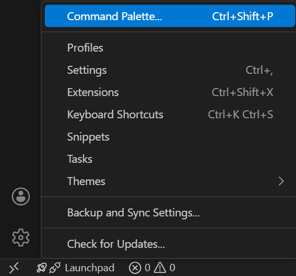

-
Type
package.

Install a package
- In the Command Palette, type
(CFS) Install Packageand press Enter.
- A list of available packages appears.
- Select the package you need.
- A progress window shows the installation status. When finished, a confirmation message appears.
Note
Some packages may require license acceptance before installation. If prompted, review the license agreement and any referenced URLs, then select Accept (or Accept All) to proceed.
Uninstall a package
- To uninstall a package, open the Command Palette and run
(CFS) Uninstall Package. - Select a package from the list of installed packages. A progress window will appear during uninstallation, followed by a confirmation message.
Delete a package from cache
When a package is uninstalled, it remains in the local cache so it can be reinstalled without re-downloading. Use this command to remove those cached packages and free up local storage.
- Open the Command Palette and run
(CFS) Delete Package from Cache. - A list of previously installed packages that now reside in the cache appears. Select one or more packages to delete. Click OK.
- A progress window shows the deletion status. When finished, a confirmation message appears.
Tip
For information on installing packages from the local cache, see Install from local cache.