Preparing for BYOM
The Bring Your Own Model (BYOM) feature allows users to upload and deploy their own trained AI models to the EdgeBench platform. This is ideal for users who want to integrate custom architectures or domain-specific models that are not available in the model zoo.
This guide provides guidelines on training, exporting, and packaging custom BYOM models for deployment with ADI EdgeBench to ensure successful compilation and flashing.
Training your model
The remote boards used in EdgeBench are edge devices with limited flash memory. As a result, large models may not fit within the available memory and can fail during compilation. Design your training pipeline with embedded constraints in mind such as avoiding high-resolution inputs or keeping input resolutions small
Supported dependency versions
To get best results, train and export your model using the following package versions.
| Package | Version |
|---|---|
| Python | python>=3.1.0 |
| Tensorflow | tensorflow>=2.12.0 |
| PyTorch | torch>=2.1.2 |
| Open Neural Network Exchange (ONNX) | onnx<=1.13.0 |
Model input and output size constraints
Additionally, the target platform uses nanopb (Protocol Buffers for embedded systems) to transmit input/output tensors. Nanopb supports messages up to 64 KB by default. If a model’s input or output tensor exceeds this limit, firmware compilation will fail even if the model is otherwise valid.
As an example, for an input tensor with shape [224 x 224 x 3] and float32 datatype (4 bytes) will result to 588KB. This exceeds nanopb’s 64 KB limit by ~9×, causing a build failure during firmware compilation. int8 quantization is strongly preferred.
Exporting your model
Ensure that your exported model includes both the network architecture and the trained weights. These may be packaged together in a single file or provided separately, depending on the framework. Refer to the guidelines below for framework‑specific instructions.
PyTorch
| Case | Required Files | Remarks |
|---|---|---|
| Case 1: Single Model File | - PT or *PTH (complete model architecture + trained weights) - input_shape.txt |
input_shape.txt file must only contain a valid input shape in one of the accepted formats below: Tuple: (1, 3, 224, 224) Array: [1, 3, 224, 224] CSV: 1, 3, 224, 224 |
| Case 2: Model Definition + Weights | - MODEL.PY (full model definition) - *PT or *PTH (weights) - input_shape.txt |
- Must include MODEL.PY containing the full architecture definition - MODEL.PY must contain the complete architecture class definition. The architecture class name must match the one used during training. Ensure no syntax errors and that file loads properly. - The class name in MODEL.PY must match the trained model - input_shape.txt uses the same accepted formats: Tuple: (1, 3, 224, 224) Array: [1, 3, 224, 224] CSV: 1, 3, 224, 224 |
Important
- If you upload weights only (PT/PTH), you must also include model.py with the complete architecture class definition.
- The architecture class name in model.py must match the name used during training.
- Ensure that:
- The MODEL.PY has no syntax errors.
- You can load the model without runtime errors in PyTorch.
- The input shape must match the model’s expected dimensions.
TensorFlow
| Case | Required Files | Remarks |
|---|---|---|
| Case 1: Model in H5 format | - H5 |
Complete model (architecture + weights). |
| Case 2: Model in PB format | - PB |
Complete model with architecture. Must represent a frozen graph. |
Case 3: Model in SAVED_MODEL directory format |
- SAVED_MODEL/ directory |
Directory must contain the complete exported model (do not modify or delete internal files). |
Important
- Ensure the model is properly exported from TensorFlow.
- Do not upload checkpoint-only or partial models.
-
The model must be loadable using standard TensorFlow methods:
-
H5 for full models,
- PB for frozen graphs,
- SAVED_MODEL/ for full SavedModel exports (keep internal structure intact)
ONNX
| Case | Required Files | Remarks |
|---|---|---|
| Case 1: Model in ONNX format | - ONNX - ONNX.DATA |
Must contain the complete model graph and all trained parameters. Also include an *.ONNX.DATA file containing the large tensors (weights), particularly when they are too large to be embedded directly in the main .ONNX file. |
Warning
- ONNX models must use opset version 13 or lower
Important
- Export with all required operators included (no missing ops). Check the list below.
- Ensure ONNX version compatibility with your target runtime.
- Verify the file is not corrupted or partially exported.
List of ONNX operators convertible to TF by opset
- Abs
- Acosh
- Add
- AveragePool
- Concat
- Conv
- ConvTranspose
- Div
- Dropout
- GRU
- Input
- InstanceNormalization
- LSTM
- LayerNormalization
- Matmul
- MaxPool
- Mod
- Mul
- RNN
- Reshape
- Shape
- Slice
- Softmax
- Sub
Creating model metadata files
Some tasks require metadata files so that the EdgeBench model and data‑processing pipeline can correctly interpret outputs. Missing metadata may result in errors or inaccurate results. Metadata filenames are case‑sensitive and must match exactly.
Class labels metadata
The classes.txt metadata file is a text file that contains the labels for classification models. Tasks requiring classes.txt are as follows:
- Keyword Spotting
- Genre Identification
- Image Classification
- Image Segmentation
- Object Detection
- Visual Wake Word
When create the class labels metadata file, keep in mind the following.
| Rule | Description |
|---|---|
| One per line | Write one class label per line |
| No extras | Don’t include commas, brackets, extra spaces, or numbers (unless part of the label) |
| No empty lines | The file must not contain blank lines |
| Order matters | Class order must match the model’s output order |
| Count must match | The number of labels must equal the model’s output dimension |
Click here to download an example classes.txt file.
Sampling rate metadata
The sampling_rate.txt metadata file contains a single numeric value representing the sampling rate (in Hz). Tasks requiring sampling_rate.txt are as follows:
- Denoiser
When create the sampling rate metadata file, keep in mind the following:
| Rule | Description |
|---|---|
| First line only | The first line must contain one integer. The integer value is implicitly in Hz; no need to write the unit in the line. |
| No units | Do not include “Hz” or any text. |
| No extra characters | No symbols or trailing spaces |
| Must match training | Value must match the training sampling rate. |
Click here to download an example sampling_rate.txt file.
Packaging your model
The EdgeBench platform requires you to create a compressed archive file containing all of the model and metadata files.
- Accepted archive formats: ZIP or TAR.GZ
- Maximum file size: 100 MB
- Folder structure: Place model files at the top-level directory inside the archive.
- Input Shape File: Required only for PyTorch models in .txt format with accepted formats as listed above.
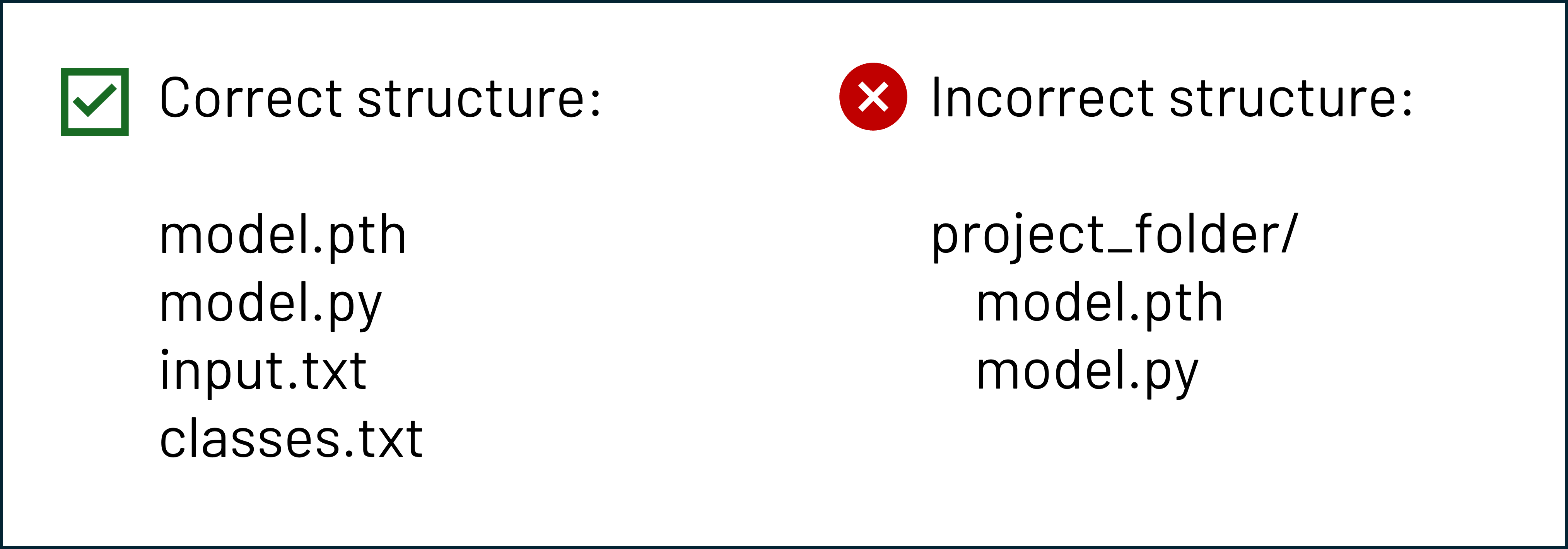
Once you prepare the model package (ZIP, TAR), you can upload it through the Workspace. See Workspace Tasks page for detailed instructions.