Analog Attach
Accelerate embedded Linux development and eliminate complexity with visual device tree configuration.
What is Analog Attach?

Analog Attach is a VS Code custom editor extension that transforms device tree configuration for embedded Linux development through visual editing interfaces. As a custom editor, it provides intuitive visual workflows while simultaneously editing the underlying device tree source (.dts) and overlay (.dtso) files in real-time, ensuring that every UI interaction directly modifies the actual files developers work with. The platform combines this direct file editing capability with intelligent validation against Linux kernel device tree bindings to accelerate hardware integration while maintaining configuration accuracy.
The extension offers two complementary custom editing environments: a "Plug and Play" editor with guided three-panel workflows for rapid device integration, and an "Advanced Device Tree Editor" for complex hierarchical configurations. Both editors maintain live synchronization between the visual interface and the underlying device tree files, allowing developers to seamlessly switch between visual and text-based editing. Built with comprehensive device binding resolution and JSON Schema validation, the platform automatically validates configurations and integrates with standard toolchains including device tree compilation and SSH deployment.
Eliminates the steep learning curve of device tree syntax, reduces time-consuming manual configuration, and prevents the error-prone process that currently creates barriers for developers and increases time-to-market.
Benefits
- Replaces manual device tree syntax editing with intuitive visual interfaces
- Provides real-time validation against device bindings and device tree syntax to prevent errors
- Streamlines the entire workflow from configuration to deployment
- Reduces barriers to entry for embedded Linux development
Key Features
- Plug and Play Editor: Three-panel guided interface for quick device integration
- Advanced Device Tree Editor: Flexible hierarchical tree manipulation for complex configurations
- Real-time Validation: Immediate feedback with binding-specific error messages
- Device Catalog: Comprehensive multi-vendor device library sourced from Linux kernel
- Integrated Workflow: Built-in compilation and SSH deployment capabilities
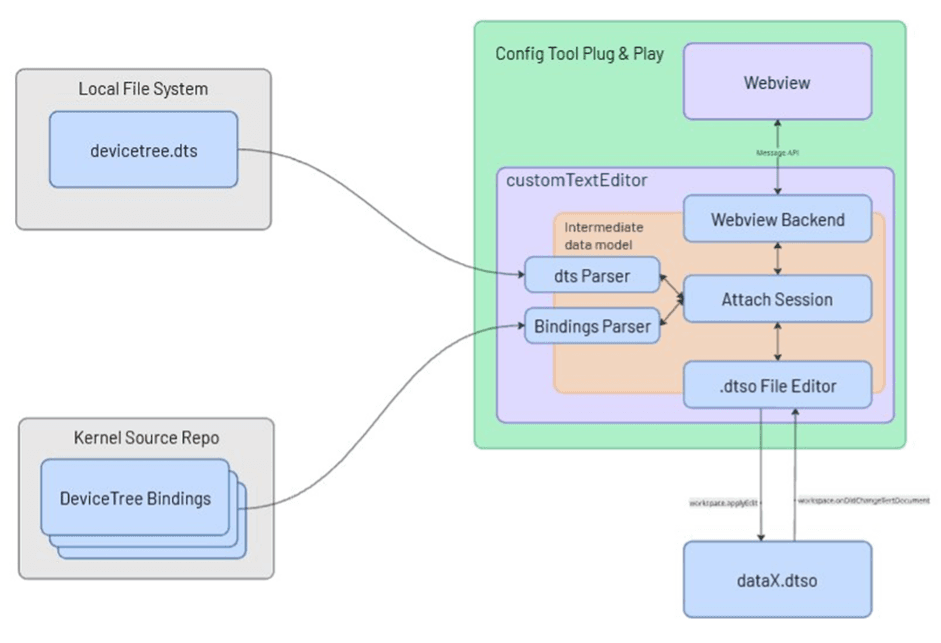
Input Processing:
1. DTS Parser receives existing device tree files (.dts/.dtso) and extracts the structure into an internal memory model
2. Parser analyses the device tree content and makes intelligent assumptions about system components (clocks, regulators, power domains, etc.)
Binding Resolution:
3. Bindings Parser attaches to the Linux kernel repository bindings folder to resolve device specifications
4. System performs Binding Resolution by inserting contextual logic based on the parsed assumptions and binding requirements
5. Compatible properties are matched to appropriate device bindings to determine available configurations
UI Generation & Interaction:
6. UI (Webview) creates dynamic interface panels based on the resolved bindings and device capabilities
7. User interacts with the visual interface to add, remove, or configure devices and properties
8. Real-time Validation occurs against binding specifications as users make changes
Output & File Management:
9. All UI interactions are synchronized in real-time with the underlying device tree files
10. Files are edited in place, maintaining the original file structure while reflecting visual changes
11. Compilation & Deployment tools integrate with standard toolchains for final binary generation and target deployment
Software Stack
SDK/Libraries
- VS Code Extension API - Core extension framework and custom editor integration
- React - Frontend UI components for webview applications
- TypeScript - Primary development language for extension logic
- Attach Library - Core business logic engine for device tree manipulation
- JSON Schema - Device tree binding validation and constraint enforcement
- dt-schema - Linux kernel device tree schema validation integration
- Device Tree Compiler (dtc) - Binary compilation of .dts/.dtso files
- SSH/SCP Libraries - Remote deployment and file transfer capabilities
- Linux Kernel Bindings - Official device tree binding specifications from kernel repository
Middleware/OS Support
- Linux - Primary target platform with native device tree support
- Windows with WSL2 - Full functionality through Windows Subsystem for Linux
Note: While the VS Code extension runs cross-platform, device tree functionality requires Linux kernel toolchain access, making Linux or WSL2 essential for core operations.
Required Hardware
Boards/Evaluation Board
- Compatible with any Linux-based embedded platform that uses device tree configuration.
Sensors/Peripherals
Analog Attach is designed to work with the entire ecosystem of Linux-compatible devices.
Getting Started
Software Requirements:
- VS Code (version 1.96.0 or higher)
- Linux operating system OR Windows with WSL2 enabled
- Device Tree Compiler (dtc) - typically included with Linux distributions
- Basic SSH access to target hardware (for deployment)
Installation Steps:
1. Install VS Code if not already installed
2. Install Analog Attach extension from the VS Code marketplace
3. Open a .dts or .dtso file (or create a new one)
5. Choose your editor:
- Plug and Play Editor (default) - for guided device integration
- Advanced Device Tree Editor - for advanced-level control
6. Add devices from the catalog and configure properties
7. Compile using commands button on the left side panel
8. Deploy to target hardware if needed
See Analog Attach in action across both the Plug‑and‑Play Editor and the Advanced Device Tree Editor – using the same AD7124‑8 overlay.
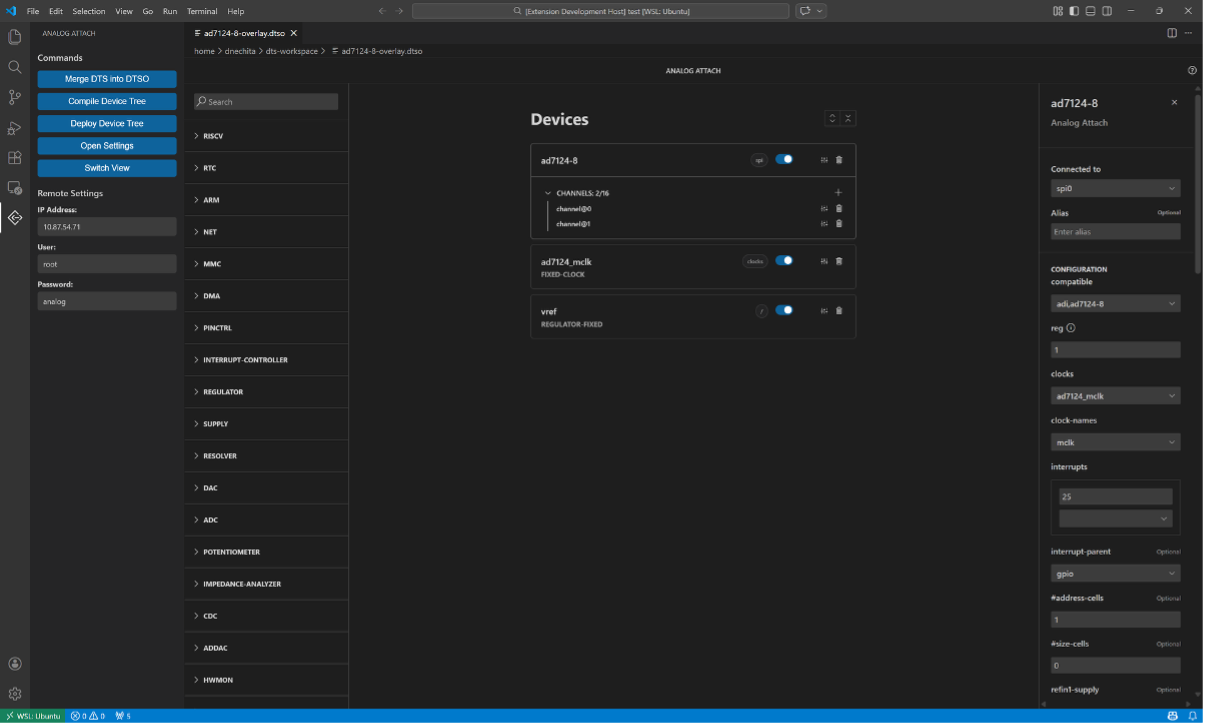
Configure the AD7124‑8 overlay in the Plug‑and‑Play Editor with a guided experience.

Open the exact same AD7124‑8 overlay in the Advanced Device Tree Editor for full visibility and low‑level control of the generated device tree.

Use the Add Node Wizard in the Advanced Device Tree Editor to insert new nodes safely, with schema‑aware suggestions that keep your overlay valid.
Tutorial: Creating an AD7124-8 Device Tree Overlay
Related Resources
Documentation - https://analogdevicesinc.github.io/analog-attach/
Repository - https://github.com/analogdevicesinc/analog-attach
Comments
Join the conversation at EngineerZone